Saturday, October 8, 2016

How to Detect the Name and Location Of an Unknown Caller
Have you ever experienced receiving call from an unknown caller before?  So times it hurts when you do really know who is calling you, especially when they keep disturbing you with phone calls from unknown sources. Don't you think you should trace who it is? 

How to Detect the Name and Location Of an Unknown Caller


Today, I bring to you an Android application which call really help you with the key to unlock the secret of that unknown caller disturbing you. This app works perfectly in terms that it shows the name of the unknown number immediately your phone starts ringing, isn't that amazing? This app is called Truecaller.

How Does Truecaller Works 

The name says it all, truecaller is an Android App that detects the true name and location of an unknown caller therefore reducing spam by its ability to;
  • Detect unknown caller ID 
  • Unwrap unknown caller's name
  • Blacklist a particular number
  • Block a particular number from sending you messages too. 
To start using truecaller, follow the below procedures 

1. Download the truecaller app here
2. Setup the App
3. Now to find the name and location of that unknown number, just input the number in the search bar, search and wait till the app unveils the name and location of the caller. 

I hope you don't have any problems finding that unknown caller that keeps disturbing you? Don't forget to drop your feedbacks and keep sharing with your friends. 
Monday, February 15, 2016

Rock MTN 0.0kobo Free Browsing Using Psiphon handler.
Wow!!  Today is Valentine, I wish all the fans of this blog and our blog readers a Happy Valentine's Day. Well I can say MTN is celebrating Valentine for us by not blocking the 0.0kobo free browsing that has been going on lately.

In my last post, I talked about how to use mtn 0.0kobo free browsing with Simple Android Server (SAS), I later realized that many people are not able to connect successful with SAS which was very absurd.

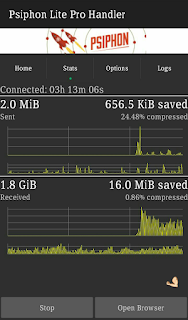
Due to this reason, am here again bringing to you how to rock Mtn free browsing using psiphon handler. Well, when we talk about psiphon we shouldn't forget to talk about the tremendous internet speed which makes this app rank high in the lists of VPN applications.  To enjoy this wonderful VPN application, follow the steps below.

How To Use MTN 0.0kobo Free Browsing With Psiphon Handler. 

1.  Download Psiphon Pro handler HERE
2.  Set your phone Apn to default  or create a new Apn with the following;

  • Apn : web.gprs.mtnnigeria.net
  • Proxy: 127.0.0.1
  • Port: 8080

3.  Now launch your Psiphon handler.
4.  Configure the first page as follows,

  • Proxy type : Real host
  • Proxy server : http://172.16.5.226@
  • Real proxy type : Inject
  • Real proxy port : 80
5.   Save it and swipe to the option tab.
6.   Under the Server region select United States.
7.   Now click on More Options and tick HTTP and configure the rest as follows;

  • Host address: 10.199.212.2
  • Port : 8080

8.   Now gently click on the start button, take a cup of tea as your psiphon connects.


Is this post helpful to you??  Or you have problem connecting??  Give us feedback through the comment box. 

Tuesday, February 9, 2016

Browse Free With Mtn 0.0kobo Now Via SAS
Lately, free browsing tricks has been very scarce to the extent that more imei tweakers thought this is the end of free browsing. Am happy to tell you today that hope is not lost, most if you must have enjoyed Etisalat 0.0kobo free browsing, although it's slow, but it's better than nothing. Today am bringing to you Mtn 0.0kobo free browsing via SaS hacked version. This has been going for a while now and I think it's high time you know about it.

Requirements 


  1. Simple Server Cracked Version( SAS) . Click here to download it .
  2. A little Tech brain and exercise patience.

How To Use Mtn 0.0kobo Via SAS(Simple Server Android) .

  1. Create an APN address on your Phone with the following settings. 
APN: web.gprs.mtnnigeria.net. 
Proxy: Empty. 
Port: Empty.
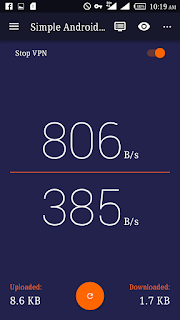
2.  Now open your Simple Android Server v4.
3.  Goto the settings
4.  Click "Set connection mode" and select "VPN mode".
5.   Go back to connection settings and in the Proxy Host and Port input the following respectively.
Proxy Host : 10.199.212.2 
Proxy Port : 8080
6.  Now Tick "Enable Header Tweaking"
7.  In the Tweak Type Select "Host Replacement"
8.  In the Injection Host Input this : http://172.16.5.226@

Now Start your SAS and feel the incredible speed of SaS.

Wednesday, September 23, 2015

VERY HOT!!  WEDNESDAY 23,  BANKER BETS FOR TODAY

Hottest betting tips for today

My first sure fix match for today you can stake all you gat.....


..••••FREE FOR CONFIDENCE ◕◕◕

◕► Italy - Serie A

◕► Palermo Vs Sassuolo

◕►Tip: x FT

◕►Odd : 3,60

◕► France - Ligue 1

◕► Lorient-Caen

◕►Tip: x FT

◕► Odd : 3,50

◕► Extra Tip : x/x...

SECOND BET

FC Schalke 04 - Eintracht Frankfurt= 1X

Bayer 04 Leverkusen - FSV Mainz 05= 1

TSG 1899 Hoffenheim - Borussia Dortmund=2

RC Celta De Vigo - FC Barcelona= X2

UD Levante - SD Eibar= 1X

Carpi FC 1909 - SSC Napoli= X2

AC Fiorentina - Bologna FC= over 0.5

Juventus Turin - Frosinone= 1

Tottenham Hotspur - Arsenal FC= over 1.5

Walsall FC - Chelsea FC= over 0.5

Athletic Bilbao - Real Madrid= 2

Stake at least 1000 on dis game and you will be smiles tonight

Did you find this helpful??

Like our official page on Facebook 

Etisalat Unlimited browsing and downloading via tweakware

I bet this is what you have been waiting for, surfing and downloading unlimitedly without any limit


 Today,  am very happy to tell you that what you have all been waiting for is finally here, with Etisalat chat pack unlimited browsing via Tweakware.

Now let's just quickly speed through the procedures on how to activate this unlimited browsing with Etisalat chat pack via tweakware.

Tweakware is an application that is one of the  best Android apps with VPN Servers, with unstoppable ip address,tweakware is another app like simple server and openvpn.

NOTE:

You must have activate your Etisalat with the chat Pack Then you can proceed to the next step, if you have not,then dail

*200*3*3*1*2*1# for 1week at #150

*200*3*3*1*1*1# for a day at #50

Procedures

- Go to Google playstore, search for Tweakware,  download it and install the app or download it HERE
- Go to your settings>network settings >access points name> then create a new access point, with the settings below
Name: Etisalat chatpack
Apn : etisalat
Then save it
-Now launch your Tweakware and press option on your Android and select settings
-The click on Bundled Setting and tick "Use Bundled setting"
Then click on Select Bundled setting and Choose ETI CHAT PACK.

-Then go back and Tap CONNECT .
And start surfing and downloading  Unlimitedly, it far more faster and better than other VPN apps.
 GREAT NEWS
1-No root access is needed for this
2-It powers all apps no need to use autoproxy 


Did you enjoy this post??

Like our Facebook page below

Enjoy more from Nigernote.blogspot.com

Thursday, September 17, 2015

Apple iOS 9 - 5 Notable Features & How to Update

iOS 9 was rolled out hours ago and I can tell you that you don’t need to be buy iPhone 6s before you have this newest update. The biggest of it all is the battery.


Apple iOS 9 - 5 Notable Features & How to Update
iOS 9 was rolled out hours ago and I can tell you that you don’t need to be buy iPhone 6s before you have this newest update. The biggest of it all is the battery.

5 Notable features of iOS 9


==> It can predict what apps you want to use
Apple’s calling this feature “triggers,” and basically allows your iPhone to make an educated guess to which app you’ll want to use based on a particular action.


==> Siri is also suggesting what you might want
Hoping to give the iPhone a Google Now alternative, Siri has been updated to now offer her own suggestions. This includes anything from apps you might want to use, places you might want to visit or people you might want to talk to.

==> Battery life

Apple iOS 9 has more power efficient and includes a low-power mode to save battery even further. This works much the same way that similar modes do on Android by dimming the screen and limiting apps that run in the background.

==> You can hide all those personal selfies
In iOS 9 you can hide all those personal or secret photos at once. In your camera roll, tap Select and choose all the images you wish to hide. Then tap the share button in the bottom-left corner and choose Hide.

==> Unknown caller suggestions

 In iOS 9, your iPhone now has the ability to suggest callers you don’t have in your contacts.

How Can I Update to iOS 9?


Launch Settings
Tap On General
Tap on Software update, wait a while and you should get the iOS 9 software update available.
Alternatively, you can connect your iPhone or iPad to your PC and use your iTunes to update it directly. File size is 1.8GB depending on the device.

Monday, September 14, 2015

How to install MTK65XX Preloader USB VCom Drivers in Windows


Install MTK65XX Preloader USB Vcom Drivers for SP Flash Tools in Windows.

Generally many users face the problem of VCom drivers are not getting installed for their MediaTek device, we require VCom drivers usually when we flash firmware in our device with SP Flash Tools or any other similar tool.


Today i’m sharing this guide which will help you in installing MTK VCOM Drivers in your PC Manually.
This Guide works with Windows XP, Vista and Windows 7 Based Operating systems

How to install USB Vcom Driver:>

Step 1 :- Firstly Download MTK USB VCOM Drivers for your device model from Here

Step 2 :- Now open Device Manager in your PC by right clicking on My Computer and then click on Manage.

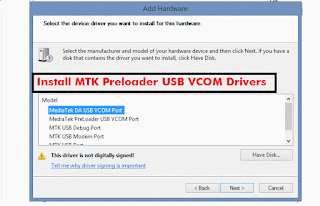
Step 3 :- Next go to Device Manager in that and click on your PC name and then click on Add legacy hardware, see below screenshot.


Step 4 :- Now in Add Hardware Wizard click on Next >> Install the Hardware that i manually select from a list (Advanced) >> Show All Devices >> Next >>Have a Disk >> Browse, Now select the any inf file from where you extracted the downloaded drivers.

Step 5 :- Now click on Next on the wizard to install the drivers and when promoted for security issue just click on install any anyway to finish the driver installation.

Step 6 :- That’s it after clicking on Finish Restart your PC and use your tool with VCOM Drivers.

If you face any problem then please comment below.

Saturday, September 12, 2015

How to reverse infinix hot note pro into stock recovery
As a result of the lollipop update that just rolled out, infinix hot note pro user's have been finding it very difficult to update their phone, due to them unable to flash back to stock recovery. So I decided to bring this quick guide on how to flash back your stock recovery, for those who have installed CWM Recovery.
Now let's get to business
Requirements 
- Mobile Uncle.
- Stock recovery. Download Here
- A little sharp brain

-After downloading the above recovery.Img, move the file to the root of your SD card.
-Now open your mobile uncle,
Go straight to Recovery Update. Click it and you will see the recovery there after d search is finished. Now click the recovery and select flash, after d flash is finished reboot your phone into recovery mode..  Yoola your have successfully install your stock recovery back.

If you are having any problems or questions regarding this, kindly hit the comments box for help. 

Friday, September 11, 2015

How to increase the volume of your Android phone, steps with images

I discovered lately that, most of the mobile user's especially Android users are tired of hearing that low sound coming out of their phones.  
Well am very happy to inform you Android users out there that there is finally a way to increase the volume of your Android phone.... 

Requirements

(1) Mobile Uncle Tools 

(2) A little sharp brain 

STEP 1

Add caption
Open your mobile uncle,  Click on Engineering Mode

STEP 2

Select Engineering Mode (MTK) 


STEP 3

Swipe to the left till you see AUDIO under HARDWARE TESTING 

STEP 4

Select AUDIO,  then select LOUDSPEAKER MODE

STEP 5

Now increase the VALUE  to 255,also the MAX VOL to 160, then click set and see the magic 


NOTE
You can change those digits if your volume is too loud, also you can apply this method for the HEADSET MODE as well... 

Tuesday, September 8, 2015

How to Root Infinix Hot Note & Hot Note Pro 5.1 Lollipop

This tutorial will be helpful for those who have updated Infinix Hot Note or Hot Note Pro to lollipop who want to root their device again.

I want to believe that you already have all the files so long you are running 5.1 Lollipop on your hot note or pro device.


Requirements
==>SP Flash tool
==>Recovery Image (download here)
==>Super User SU (download here)

Procedures
==>Copy and extract the downloaded YP recovery.rar   on your PC
==>Copy the SuperSU to your SD card
==>Open your SPFlash tool and click on Scatter loading
==>Locate where you extracted the recovery you downloaded earlier on your pc and load the scatter file
Choose download only (See image below for guide)


Click on download (wait for the process to complete)

==>Unplug your phone and boot into recovery by pressing Volume UP+ Power or VolDown+Power until you see Philz Touch Recovery.
==>Click Install Zip from SD CARD.
==>Install the UPDATE-SuperSU-V2.46.zip you placed on your sd card earlier.
==>Reboot System Now


Congratulations! Your device is now rooted. If you are still confuse, please use the comment box below.


Thursday, September 3, 2015