Friday, January 27, 2017

Rumored specs of the BB Merah Putih built BlackBerry-branded Device

While BlackBerry Mobile have been teasing the BlackBerry 'Mercury', there's another BlackBerry-branded device for the Indonesian market that has yet to appear fully. That device, only really known as BlackBerry - BBC100-1, comes from the device software licensing agreement BlackBerry put together with joint venture PT BB Merah Putih. Below are some quick specs.

BlackBerry "BBC100-1": Snapdragon 425 1,4 GHz, 5.5in, 720p HD, 4/32GB, 13/8MP, Dual-SIM, 3000mAh. Roland Quandt (@rquandt) January 26, 2017.
A couple of things stand out here. Aside from the processor, the specs seem decent and dual SIM? That would certainly be a first for a BlackBerry. It'll be interesting to see how this device gets rolled out. 

We're starting to see how BlackBerry Mobile will be handling the BlackBerry brand starting with the BlackBerry 'Mercury'

Saturday, October 8, 2016

How to Detect the Name and Location Of an Unknown Caller
Have you ever experienced receiving call from an unknown caller before?  So times it hurts when you do really know who is calling you, especially when they keep disturbing you with phone calls from unknown sources. Don't you think you should trace who it is? 
How to Detect the Name and Location Of an Unknown Caller


Today, I bring to you an Android application which call really help you with the key to unlock the secret of that unknown caller disturbing you. This app works perfectly in terms that it shows the name of the unknown number immediately your phone starts ringing, isn't that amazing? This app is called Truecaller.

How Does Truecaller Works 

The name says it all, truecaller is an Android App that detects the true name and location of an unknown caller therefore reducing spam by its ability to;
  • Detect unknown caller ID 
  • Unwrap unknown caller's name
  • Blacklist a particular number
  • Block a particular number from sending you messages too. 
To start using truecaller, follow the below procedures 

1. Download the truecaller app here
2. Setup the App
3. Now to find the name and location of that unknown number, just input the number in the search bar, search and wait till the app unveils the name and location of the caller. 

I hope you don't have any problems finding that unknown caller that keeps disturbing you? Don't forget to drop your feedbacks and keep sharing with your friends. 

Saturday, September 3, 2016

Sharing of Apk Files on Whatsapp Made Easier
Share Apk files on Whatsapp

There has been restrictions on sending an Android App on Whatsapp lately. You can easily transfer documents, Pdfs, Music and even videos but transfer of Apk files has been disallowed. Why can we share documents and can't share apk files?  That's where the trick comes in.

Today I will be giving a tutorial on how to send an Android file format (Apk Files)  on Whatsapp. It's just simple brain arithmetic follow the below procedures.

How To Send Apk Files On Whatsapp 

  • Locate the Apk File you want to share 
  • Rename it to .doc from .apk with Es file explorer 
  • Now Open Whatsapp >>Locate the receiver>>Share the renamed apk file.
  • After the receiver completes the download >> Tell him to change the file format back to .apk and install

You have successfully shared an apk file right on Whatsapp without stress, is that not simple? So people still don't know how to do this. Do them a favour by sharing this tutorial on social media and don't forget to drop comments.

Monday, February 15, 2016

Rock MTN 0.0kobo Free Browsing Using Psiphon handler.
Wow!!  Today is Valentine, I wish all the fans of this blog and our blog readers a Happy Valentine's Day. Well I can say MTN is celebrating Valentine for us by not blocking the 0.0kobo free browsing that has been going on lately.

In my last post, I talked about how to use mtn 0.0kobo free browsing with Simple Android Server (SAS), I later realized that many people are not able to connect successful with SAS which was very absurd.

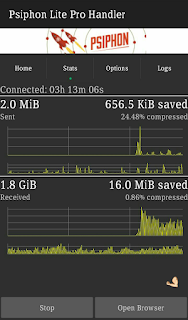
Due to this reason, am here again bringing to you how to rock Mtn free browsing using psiphon handler. Well, when we talk about psiphon we shouldn't forget to talk about the tremendous internet speed which makes this app rank high in the lists of VPN applications.  To enjoy this wonderful VPN application, follow the steps below.

How To Use MTN 0.0kobo Free Browsing With Psiphon Handler. 

1.  Download Psiphon Pro handler HERE
2.  Set your phone Apn to default  or create a new Apn with the following;

  • Apn : web.gprs.mtnnigeria.net
  • Proxy: 127.0.0.1
  • Port: 8080

3.  Now launch your Psiphon handler.
4.  Configure the first page as follows,

  • Proxy type : Real host
  • Proxy server : http://172.16.5.226@
  • Real proxy type : Inject
  • Real proxy port : 80
5.   Save it and swipe to the option tab.
6.   Under the Server region select United States.
7.   Now click on More Options and tick HTTP and configure the rest as follows;

  • Host address: 10.199.212.2
  • Port : 8080

8.   Now gently click on the start button, take a cup of tea as your psiphon connects.


Is this post helpful to you??  Or you have problem connecting??  Give us feedback through the comment box. 

Tuesday, February 9, 2016

Browse Free With Mtn 0.0kobo Now Via SAS
Lately, free browsing tricks has been very scarce to the extent that more imei tweakers thought this is the end of free browsing. Am happy to tell you today that hope is not lost, most if you must have enjoyed Etisalat 0.0kobo free browsing, although it's slow, but it's better than nothing. Today am bringing to you Mtn 0.0kobo free browsing via SaS hacked version. This has been going for a while now and I think it's high time you know about it.

Requirements 


  1. Simple Server Cracked Version( SAS) . Click here to download it .
  2. A little Tech brain and exercise patience.

How To Use Mtn 0.0kobo Via SAS(Simple Server Android) .

  1. Create an APN address on your Phone with the following settings. 
APN: web.gprs.mtnnigeria.net. 
Proxy: Empty. 
Port: Empty.
2.  Now open your Simple Android Server v4.
3.  Goto the settings
4.  Click "Set connection mode" and select "VPN mode".
5.   Go back to connection settings and in the Proxy Host and Port input the following respectively.
Proxy Host : 10.199.212.2 
Proxy Port : 8080
6.  Now Tick "Enable Header Tweaking"
7.  In the Tweak Type Select "Host Replacement"
8.  In the Injection Host Input this : http://172.16.5.226@

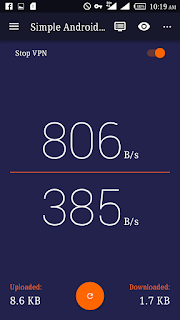
Now Start your SAS and feel the incredible speed of SaS.

Wednesday, September 23, 2015

VERY HOT!!  WEDNESDAY 23,  BANKER BETS FOR TODAY

Hottest betting tips for today

My first sure fix match for today you can stake all you gat.....


..••••FREE FOR CONFIDENCE ◕◕◕

◕► Italy - Serie A

◕► Palermo Vs Sassuolo

◕►Tip: x FT

◕►Odd : 3,60

◕► France - Ligue 1

◕► Lorient-Caen

◕►Tip: x FT

◕► Odd : 3,50

◕► Extra Tip : x/x...

SECOND BET

FC Schalke 04 - Eintracht Frankfurt= 1X

Bayer 04 Leverkusen - FSV Mainz 05= 1

TSG 1899 Hoffenheim - Borussia Dortmund=2

RC Celta De Vigo - FC Barcelona= X2

UD Levante - SD Eibar= 1X

Carpi FC 1909 - SSC Napoli= X2

AC Fiorentina - Bologna FC= over 0.5

Juventus Turin - Frosinone= 1

Tottenham Hotspur - Arsenal FC= over 1.5

Walsall FC - Chelsea FC= over 0.5

Athletic Bilbao - Real Madrid= 2

Stake at least 1000 on dis game and you will be smiles tonight

Did you find this helpful??

Like our official page on Facebook 

Etisalat Unlimited browsing and downloading via tweakware

I bet this is what you have been waiting for, surfing and downloading unlimitedly without any limit


 Today,  am very happy to tell you that what you have all been waiting for is finally here, with Etisalat chat pack unlimited browsing via Tweakware.

Now let's just quickly speed through the procedures on how to activate this unlimited browsing with Etisalat chat pack via tweakware.

Tweakware is an application that is one of the  best Android apps with VPN Servers, with unstoppable ip address,tweakware is another app like simple server and openvpn.

NOTE:

You must have activate your Etisalat with the chat Pack Then you can proceed to the next step, if you have not,then dail

*200*3*3*1*2*1# for 1week at #150

*200*3*3*1*1*1# for a day at #50

Procedures

- Go to Google playstore, search for Tweakware,  download it and install the app or download it HERE
- Go to your settings>network settings >access points name> then create a new access point, with the settings below
Name: Etisalat chatpack
Apn : etisalat
Then save it
-Now launch your Tweakware and press option on your Android and select settings
-The click on Bundled Setting and tick "Use Bundled setting"
Then click on Select Bundled setting and Choose ETI CHAT PACK.

-Then go back and Tap CONNECT .
And start surfing and downloading  Unlimitedly, it far more faster and better than other VPN apps.
 GREAT NEWS
1-No root access is needed for this
2-It powers all apps no need to use autoproxy 


Did you enjoy this post??

Like our Facebook page below

Enjoy more from Nigernote.blogspot.com

Thursday, September 17, 2015

Apple iOS 9 - 5 Notable Features & How to Update

iOS 9 was rolled out hours ago and I can tell you that you don’t need to be buy iPhone 6s before you have this newest update. The biggest of it all is the battery.


Apple iOS 9 - 5 Notable Features & How to Update
iOS 9 was rolled out hours ago and I can tell you that you don’t need to be buy iPhone 6s before you have this newest update. The biggest of it all is the battery.

5 Notable features of iOS 9


==> It can predict what apps you want to use
Apple’s calling this feature “triggers,” and basically allows your iPhone to make an educated guess to which app you’ll want to use based on a particular action.


==> Siri is also suggesting what you might want
Hoping to give the iPhone a Google Now alternative, Siri has been updated to now offer her own suggestions. This includes anything from apps you might want to use, places you might want to visit or people you might want to talk to.

==> Battery life

Apple iOS 9 has more power efficient and includes a low-power mode to save battery even further. This works much the same way that similar modes do on Android by dimming the screen and limiting apps that run in the background.

==> You can hide all those personal selfies
In iOS 9 you can hide all those personal or secret photos at once. In your camera roll, tap Select and choose all the images you wish to hide. Then tap the share button in the bottom-left corner and choose Hide.

==> Unknown caller suggestions

 In iOS 9, your iPhone now has the ability to suggest callers you don’t have in your contacts.

How Can I Update to iOS 9?


Launch Settings
Tap On General
Tap on Software update, wait a while and you should get the iOS 9 software update available.
Alternatively, you can connect your iPhone or iPad to your PC and use your iTunes to update it directly. File size is 1.8GB depending on the device.

Wednesday, September 16, 2015

Chris Brown Says He’s Tired Of Worshipping The Devil…And God Spoke To Him – Watch Interview


Chris Brown  > The popular American Hip Hop singer Chris Brown has said that he is tired of the devil ruining his life.

In a recent Instagram post, the award-winning singer blamed the devil for trying to ruin his life. He also talked about thoughts of suicide and claims he’s heard God speak to him for the very first time.


Chris Brown

Here’s exactly what he wrote:

“When u tired of the fucking devil ruining your life and u hear God speak for the first time.


No one knows what I deal with on a day to day. The average man wouldn’t hesitate to blow his fucking brains out but that’s the cowards way out… Most won’t understand the genius and beauty in change and learning and the people who have devilish intentions will win in the short term. My soul will always be pure of heart.

What’s on the surface always looks like one big party but inside there is a little boy looking for help and guidance. People say “be a man”. Yeah, that’s right but it doesn’t take away any pain you really go through. I just wanna stay out the way and do music. Most importantly and great father.

I don’t have any more patience for anything that will cause me to self destruct!!”

This guy needs all our prayers and support. He was a young boy when all ‘these’ started and the devil deceived him.

Advice to Chris  Brown >

Chris, the good news is your soul was already bought by the blood of Christ even before you went into any evil pact. The bible says that “even the lawful captive shall be set free.”
In Isaiah chapter 49, verses 24 & 25, the New Living Translation says:


“Who can snatch the plunder of war from the hands of a warrior? Who can demand that a tyrant let his captives go?”

“But the LORD says, “The captives of warriors will be released, and the plunder of tyrants will be retrieved. For I will fight those who fight you, and I will save your children.”

This means if your choices have put you in a bad place, when you SINCERELY ask God for help, He will come to your aid. Read Psalm 121…declaring it into your life as you wake up each morning.

David found his way back on the right path once when he felt lost. And there was one night, I had an encounter with a strange and powerful demon. The Lord whispered the same psalm into my ears to use as a weapon. Yes, I won the battle.

I’ll say a prayer for you everyday brother, and I’ll encourage others to do same. Hang in there.

Please kindly take a moment to like us on Facebook
LIKE


Monday, September 14, 2015

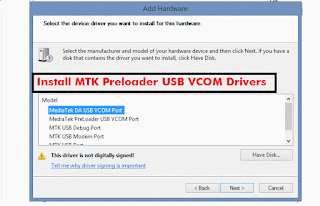
How to install MTK65XX Preloader USB VCom Drivers in Windows


Install MTK65XX Preloader USB Vcom Drivers for SP Flash Tools in Windows.

Generally many users face the problem of VCom drivers are not getting installed for their MediaTek device, we require VCom drivers usually when we flash firmware in our device with SP Flash Tools or any other similar tool.


Today i’m sharing this guide which will help you in installing MTK VCOM Drivers in your PC Manually.
This Guide works with Windows XP, Vista and Windows 7 Based Operating systems

How to install USB Vcom Driver:>

Step 1 :- Firstly Download MTK USB VCOM Drivers for your device model from Here

Step 2 :- Now open Device Manager in your PC by right clicking on My Computer and then click on Manage.

Step 3 :- Next go to Device Manager in that and click on your PC name and then click on Add legacy hardware, see below screenshot.


Step 4 :- Now in Add Hardware Wizard click on Next >> Install the Hardware that i manually select from a list (Advanced) >> Show All Devices >> Next >>Have a Disk >> Browse, Now select the any inf file from where you extracted the downloaded drivers.

Step 5 :- Now click on Next on the wizard to install the drivers and when promoted for security issue just click on install any anyway to finish the driver installation.

Step 6 :- That’s it after clicking on Finish Restart your PC and use your tool with VCOM Drivers.

If you face any problem then please comment below.

TUTORIAL: HOW TO UPGRADE YOUR INFINIX HOT NOTE AND HOT NOTE PRO TO LOLLIPOP 5.1 (0828) VERSION

Now without wasting much time on flashing the infinix hot note pro lollipop 0703 version,  you can head straight to flash the newest version(0828).

NOTE:
I won't be held responsible if you brick your phone due to not following the below instructions carefully. 

Now, let's do this together.

REQUIREMENTS

-A personal computer

-A good USB to phone cable. 
-SP Flash tool v5. Download Here
-Mediatek vcom driver. Download  Here and see guide installation guideHere
-Your downloaded lollipop update version 0828. See Here
-Make sure you are on infinix hot note pro stock recovery, if you are not, download it Here and flash it with mobile uncle. See guide Here
-Make sure you have fully unrooted your phone
Step by step procedure
1. Extract the lollipop update to a location of your choice on your Pc
2. Extract the SP Flash tool v5 also.
3. Switch off your phone and don't plug it in yet.
4. Open the SP Flashtool extracted, locate and double click on flashtool.exe
5. Go to scatter loading, browse to the infinix rom folder and select the scatter file. 

6. Next,  go to the Download only as seen in the picture below, click on it and select “firmware upgrade” from the drop-down.
7. Now click on the green arrow labelled “Download”. 
8. You can now plug in your switched off phone to your Pc.

9. Relax and wait for the Green check mark arrow as shown below. This may take about 4-7mins
10. After the check confirmation, close the flashtool, disconnect your phone and switch it on. First boot will take some few minutes 

11. That's all.
Kindly hit the comment box if you find this interesting or if you have any question. 
Infinix hot note and infinix hot  pro lollipop version  0911 update

Infinix mobility has been fulfilling their promises, infinix mobility  promise infinix hot note and note pro users official lollipop update last month, and they fulfilled their promise with rolling out d 0703,0813 & 0828 version of lollipop update and infinix are doing it again. The great news is that another lollipop update is available for both infinix hot note and infinix hot note pro user's, joyfully, it's available via OTA.


Android 5.1


Latest :

20150911:Official Version GM
1) Optimized Xwallpaper layout, added Gallery, Live Wallpaper entry, and Download category
2) Added Video player brightness and volume gesture control
3) Changed Recent key long press to Menu function
4) Optimized Camera's effect 
5) Fixed original image disappeared after edit issue
6) Fixed tone selection from file manager
7) Optimized and fixed other issues from XCLUB fans
8) Improved system stability and performance


Infinix hot note X551 16gb+1gb ram:


Latest 0911 full rom for those that are still on Kitkat download at the link below and flash using sp flash tools
http://adf.ly/1O5bak ( you can download it Via IDM )

For those already on lollipop version 0828 , update via OTA, but if you receive system update has stopped working download the update below, move it to SD card,  Boot into recovery and update from SD card
A_package_20150828_20150910.rar

http://adf.ly/1O5ubA

Infinix hot note pro X551 download from the link below 

Latest 0911 full rom for those that are still on Kitkat download at the link below and flash using sp flash tools 

http://adf.ly/1O5nQG

For those already on lollipop version 0828 , update via OTA, but if you receive system update has stopped working download the update below, move it to SD card,  Boot into recovery and update from SD card

BC_package_20150828_20150910.rar
http://adf.ly/1O5ugP 

NOTE : Sure your phone is not rooted to avoid bricking. 

Kindly hit the comment box below if you have any question. 

Saturday, September 12, 2015

How to reverse infinix hot note pro into stock recovery
As a result of the lollipop update that just rolled out, infinix hot note pro user's have been finding it very difficult to update their phone, due to them unable to flash back to stock recovery. So I decided to bring this quick guide on how to flash back your stock recovery, for those who have installed CWM Recovery.
Now let's get to business
Requirements 
- Mobile Uncle.
- Stock recovery. Download Here
- A little sharp brain

-After downloading the above recovery.Img, move the file to the root of your SD card.
-Now open your mobile uncle,
Go straight to Recovery Update. Click it and you will see the recovery there after d search is finished. Now click the recovery and select flash, after d flash is finished reboot your phone into recovery mode..  Yoola your have successfully install your stock recovery back.

If you are having any problems or questions regarding this, kindly hit the comments box for help. 

Friday, September 11, 2015

How to increase the volume of your Android phone, steps with images

I discovered lately that, most of the mobile user's especially Android users are tired of hearing that low sound coming out of their phones.  
Well am very happy to inform you Android users out there that there is finally a way to increase the volume of your Android phone.... 

Requirements

(1) Mobile Uncle Tools 

(2) A little sharp brain 

STEP 1

Add caption
Open your mobile uncle,  Click on Engineering Mode

STEP 2

Select Engineering Mode (MTK) 


STEP 3

Swipe to the left till you see AUDIO under HARDWARE TESTING 

STEP 4

Select AUDIO,  then select LOUDSPEAKER MODE

STEP 5

Now increase the VALUE  to 255,also the MAX VOL to 160, then click set and see the magic 


NOTE
You can change those digits if your volume is too loud, also you can apply this method for the HEADSET MODE as well... 

Thursday, September 10, 2015

Apple Introduces The iPhone 6S And iPhone 6S Plus (See Stunning Photos)


Today, Apple has unveiled the latest generation of the iPhone in the form of the iPhone 6S and the iPhone 6S Plus. Rumors have been swirling for the past few months, with suggestions that Apple would integrate a Force Touch Display, update the devices’ cameras, and use a more powerful processor.

But the moment of truth has finally arrived, so let’s get to it.

As can be expected from an ‘S’ year, the next-generation iPhones don’t look all that different from last year’s models. However, the innards have been significantly tweaked.

Design 

Following rumors, the next iPhone will come in a rose gold color, and all iPhone models are made with a brand new Apple custom alloy, the same alloys used in the aerospace industry. The Apple team has also introduced a new type of stronger gla$$ for the display.

3D touch

Apple has introduced a feature called 3D Touch, which shows an extra dimension to the screen you’re used to. Using Force Touch, which is already available on the Apple Watch and on new MacBooks, users can hold down on various apps to both ‘peek’ and ‘pop’.

For example, you could lightly tap on the content of an email to peek at the content inside, and if you press harder, the content you’re peeking at will pop open fully.

As is standard with Force Touch, the iPhone will offer haptic feedback as a part of the 3D Touch experience.

A few examples of 3D Touch on the iPhone include: lightly tap on the camera icon to get camera options, and press harder to go straight into selfie mode, lightly tap on various app to choose to go into various parts of the app, lightly tap on a flight number and get flight tracking information as a ‘peek’, or Force Touch an address to get a preview within the Maps app.

It’s not just default Apple apps that use Force Touch — Instagram, Facebook and others have integrated 3D Touch into their apps to let you peek and pop.

Latest Crunch Report

Users can also employ Force Touch to switch between apps instead of using the old double-tap on the home button. Simply Force Touch the edge of the display and swipe between previously opened apps.

This is made possible with the addition of an array of sensors added right under the display.

A9

The new A9, found in the iPhone 6S and 6S Plus, is the third generation of the 64-bit chip Apple has been using, built with a new transistor architecture. It’s 70 percent faster than the A8 chip used in the iPhone 6 and iPhone 6 Plus, and 90 percent faster graphics performance than the previous generation.

Alongside the new A9, the new iPhones will feature a brand new M9 coprocessor that is always on, to help detect motion for apps like Health. Thanks to the new processors, TouchID is twice as fast in the new phones.

Camera

For the first time in years, Apple is adding more megapixels to the iPhone camera, offering a 12-megapixel camera. That’s a 50 percent improvement from earlier generations of the iSight camera.

But in order to avoid trading off more pixels for lower image quality, Apple has introduced ‘deep trench isolation’, which separates photo diodes to help maintain accurate color quality and reduce crosstalk and noise.

The new iSight camera still protrudes slightly from the body of the phone, just as it does on the iPhone 6 and 6 Plus.

Beyond still imagery, the new iSight camera is also capable of taking 4K video, which means each frame has 8 million pixels.

Plus, the front-facing camera has been upgraded to a 5-megapixel camera. And for selfie fans out there, Apple has added a new front-facing flash feature that uses the LED screen to mimic a TrueTone flash that you’d find on the back of the camera. The display also gets 3X brighter right at the moment of capture (similar to Photo Booth on OS X) so that there is enough light for your Kardashian-style shots.

Apple is also introducing a new feature called Live Photos. This works by taking a few extra frames of photos before and after you snap a photo, so that each of your photos have snippets of live action. With the introduction of this feature, Apple is providing APIs so that third-party developers can integrate Live Photos into their own apps, with Facebook coming soon.

Some Other Stuff

The new iPhones support 23 LTE bands up to 300mbps, alongside WiFi up to 866mbps. And if you’re thinking of jumping ship from Android to iOS, Apple is releasing a new app that will help you move over your photos, notes, etc. There are also a bunch of new iCloud storage pricing plans, with 50GB for $1/month, 200GB for $2.99/month, and 1TB for $9.99/month.

In terms of pricing and availability, the new iPhone 6S and iPhone 6S Plus will come in the exact same prices and configurations as the previous generation, starting at $199 and $299 respectively for the 16GB model.

But beyond that, Apple is starting a new iPhone Upgrade Program that will allow users to get an unlocked phone that includes Apple Care and costs $32/month. Every year.

Everything goes live on September 25


See more at Nigernote.blogspot.com.


We love comments Apple Introduces The iPhone 6S And iPhone 6S Plus (See Stunning Photos)Apple Introduces The iPhone 6S And iPhone 6S Plus (See Stunning Photos)

Man Sets Guinness World Record For Pulling AEROPLANE With His Ears  see photos
37_J1
Some might say Johnny Strange is living up to his last name, because he’s just entered the record books for pulling a huge AEROPLANE with his EARS. Johnny, 26, used chains through pierced holes in his ears to drag a Cessna 172-P weighing 677.8kg for 20.4 metres at North Weald Airfield, Essex.
But being featured in the book is nothing new for Johnny, an escapologist and sideshow performer who now has eight Guinness World Records to his name. He said:
“I started off at the age of ten in Blackburn, Lancashire. At first I juggled balls, then clubs and went on to knives, fire sticks and now its chainsaws. Preparing for the plane pull was tough. I’m not going into detail but I have to stretch my ears and create tough scar tissue so they don’t rip. I am always delighted when I get another Guinness World Record and being featured in the book never gets old for me, the only problem is I’m starting to run out of places to hang up my certificates now. I’m a believer of the impossible, I’ve always been interested in the unusual and the bizarre”.
He has been dubbed ‘The man with the ears of steel’.
See More photos below:-
1
 
2 


3
 
4

- See more at: http://www.nigernote.blogspot.com

Tuesday, September 8, 2015

How to Root Infinix Hot Note & Hot Note Pro 5.1 Lollipop

This tutorial will be helpful for those who have updated Infinix Hot Note or Hot Note Pro to lollipop who want to root their device again.

I want to believe that you already have all the files so long you are running 5.1 Lollipop on your hot note or pro device.


Requirements
==>SP Flash tool
==>Recovery Image (download here)
==>Super User SU (download here)

Procedures
==>Copy and extract the downloaded YP recovery.rar   on your PC
==>Copy the SuperSU to your SD card
==>Open your SPFlash tool and click on Scatter loading
==>Locate where you extracted the recovery you downloaded earlier on your pc and load the scatter file
Choose download only (See image below for guide)


Click on download (wait for the process to complete)

==>Unplug your phone and boot into recovery by pressing Volume UP+ Power or VolDown+Power until you see Philz Touch Recovery.
==>Click Install Zip from SD CARD.
==>Install the UPDATE-SuperSU-V2.46.zip you placed on your sd card earlier.
==>Reboot System Now


Congratulations! Your device is now rooted. If you are still confuse, please use the comment box below.


Friday, August 28, 2015

FUOYE Predegree Admission Form 2015/2016 is Out
Fuoye predegree form 2015 is out. Applications are hereby invited from suitably qualified candidates for admission into the Federal University Oye-Ekiti, Pre-Degree Programme for the 2015/2016 Academic Session.
ELIGIBILITY
Eligible Candidates must possess minimum of 5 Credits in SSCE/NECO at a maximum of two sittings including English Language (for ALL Courses), Mathematics (for Science-based and Social Science-based Courses) and Literature-in-English (Humanities).
However, students with deficiencies may apply, provided the deficiencies would have been rectified before the completion of the Pre-Degree Session.
DURATION
The programme normally runs for two (2) contact periods both within nine (9) calendar months.
REGISTRATION FEE
Each candidate will be required to pay Ten Thousand Naira (N10, 000.00) only, excluding bank charges as Registration fee.
REGISTRATION PROCEDURE
i. Visit any bank and pay through e-Transact platform
ii. You will receive a print out with receipt number and confirmation order number.
iii. Visit Federal University Oye-Ekiti websitewww.fuoye.edu.ng and click on Pre-Degree link from the homepage
iv. Go to payment portal section and insert the details received from the bank and this will enable you access to the Application Form.
SUBMISSION OF APPLICATION
i. Candidates are advised to ensure that their application forms are duly and carefully completed.
ii. Keep checking the website from time to time for the actual date of the entrance examination.
iii. Applicants are to note that the 2015/2016 Pre-Degree entrance examination will be computer-based.
AVAILABLE SUBJECTS’ COMBINATIONS
Agric. Sciences: Agric./Chemistry /Physics. Biology/Chemistry/Mathematics.
Engineering: Chemistry/ Mathematics/ Physics. Geography/ Mathematics/ Physics.
Humanities: Government/Literature in English/Religious Studies.
Science: Biology/Chemistry/Physics. Physics/Chemistry/Geography. Mathematics/Chemistry/Physics.
Social Sciences: Economics/Government/Mathematics. Mathematics/Geography/Economics.
Please note that the above listed subject combinations meet the requirements (as applicable) for admission into ALL Degree Programmes in Federal University Oye-Ekiti. Credit passes in English Language and Mathematics are compulsory in O’Level with three (3) other relevant subjects.
GENERAL INFORMATION
i. Candidates are expected to note that the examination comes up at Iyke Ifenacho ICT Centre, behind United Bank of Africa (UBA), Oye-Ekiti. Please ensure you print the Examination Slip.
ii. All candidates are required to register for 2016 UTME and score the minimum cut-off mark during the Programme.
iii. All Candidates are required to use valid e-mail addresses and PERSONAL Telephone Numbers.
iv. The forms must be filled and submitted on-line on or before Friday, 25th September, 2015. No downloaded or printed copies of forms will be accepted.
v. Candidates are advised to follow the Application Instructions very carefully and ensure they select the Correct SUBJECTS’ COMBINATION. Failure to do so may adversely affect the Candidate.
IMPORTANT NOTICE
i. Submit a valid e-mail address and a valid cell phone number in your Registration Form.
ii. Registered Candidates are requested to visit our website: http://predegree.fuoye.edu.ng for any other information.
CLOSING DATE
The 2015/2016 Pre-Degree Application will close on Friday, 25th, September, 2015. The date for the Entrance Examination will be announced later.
DISCLAIMER: All candidates should note that FUOYE HAS NOT AUTHORISED anyPerson(s) or agent(s) to sell application forms on its behalf.
Best of luck To You all…
Fouyegists.blogspot.com